
Changelog
What changed in ANVL and what it means for you. We write here when something shows up in your day — not on every release.
1 Oct
2026
Ask for a page that looks like the others
Make page 5 look like pages 2 and 3 gives page 5 their sizes, spacing and components, with its own content kept, and add an end page that looks like page 1 builds the new page with the layout of page 1.
Asking for new text without giving its content — a section on allergens, say — now gives a placeholder to fill in, not an invented claim. The chat no longer asks which variant you mean when you are looking at it, and when a change is not possible it suggests what is.
1 Oct
2026
Less waiting in the conversation and the image bank
After you answer the questions in a conversation, the proposal takes a while to write. The questions it will need answered — an address, a date, a link — now appear within a second, and what you write is already filled in when the proposal arrives.
Images under Brand Kit → Images appear much faster: each card loads a small preview, and cards further down load as you scroll. Opening an image still shows the original.
1 Oct
2026
Every change holds the same quality as the first build
Refining a slide, an element or a post now goes through the same checks as a new deck — contrast, layout, logo placement and brand colours. Your change is improved, never undone: a headline you made red stays red. Redo the design redoes the layout and keeps text, figures and images, while a targeted change only touches what you point at.
One for Facebook, one for Instagram, one for LinkedIn becomes one post with a frame per channel, each in its format; Instagram and Facebook are now 4:5. Make a copy of slide 1 copies it at once, a copy in another format lands in the same folder, and In the same folder at the top of the editor takes you between them. A dropped connection during a build can be picked up again.
30 Sep
2026
Slides you add or rebuild get the same checks as the first build
A slide you add or rebuild in the editor now goes through the same fact, contrast and layout checks as the first build, and if a rebuild comes out worse, the better version is kept. What you write per slide is followed: Slide 2: three cards with the services gives three cards, and no panels means no panels.
Undo saves what is there now as a version first, and Stop ends the whole turn.
30 Sep
2026
Everything you create starts in Conversation
Create on the phone, the create button at the top of the menu and the Content Creator heading now all open a new conversation. On the phone, the box at the bottom goes straight into the conversation, where you can attach documents and photos.
The tour has four steps: create something in Conversation, upload your photos, invite your colleagues and review your brand. Choose photos and Invite do the step right from the tour. Until you choose a language yourself, ANVL follows your browser — Swedish if it prefers Swedish, otherwise English.
28 Sep
2026
The editor chat changes only what you ask for
Ask the chat in the presentation editor to shorten a heading or fix its spelling, and it changes that heading — not the rest of the slide or the deck. If something beyond your request changes anyway, the receipt says so. The chat answers in the language you write in, names colour changes in its receipt, and says so when a turn was cut off by a reload.
Ask it for another format — make a poster of this, a LinkedIn version — and it builds a copy in that format, leaving the original as it is. Styles show straight after an edit without reloading, and lists on freely drawn slides build one step at a time when you present.
28 Sep
2026
Fill in what's missing, and Build starts right away
Each point under What I am missing in a proposal now has its own field. Write your answers there and press Build: they go into the order and the build starts straight away — no new message, no waiting for a new proposal. You can also choose one of your brand's templates in the proposal, and images you attach stay in your message and follow the proposal into the build.
On a computer, Home now opens as a start page, with the greeting and the prompt box alone in the middle of the window.
25 Sep
2026
Decks and posts are drawn from scratch for your brand
Presentations and social posts — square, 4:5 and story — are now drawn from scratch for your brand by default, instead of being filled into a ready-made layout. The slide library is still there. Posts are built around a photo and a headline that carries the message, and a LinkedIn post can be landscape when you ask for it.
A post now comes with its caption: the text published above the image, with the terms, dates and call to action, which you edit and copy under Notes. Newsletters get a masthead, a lead story and short stories in columns.
25 Sep
2026
An attached document is read before anything is built
A document attached on Home, or dropped in the box on a folder's page, now opens a conversation that reads it, instead of going straight to the editor. The conversation decides from the document and what you wrote whether it becomes a summary, a comparison or something else. Brand guidelines, a template or a form attached without a word no longer turn into a deck about themselves: the conversation asks what they are for, and points to Brand Kit if you want to import guidelines as your brand.
23 Sep
2026
One account page, and a quieter celebration
The two account pages are now one — the one the account menu opens — with your profile, passkeys, password, where you are signed in, and how to delete the account. If the connection drops while you sign in, the sign-in card stays and lets you try again.
The full-screen confetti is gone. When you reach a milestone that matters — your brand is done, your first material, your first published site — a small note appears in the corner for a few seconds.
20 Sep
2026
One question card, then the proposal — and decks that never make things up
Everything the conversation needs to ask goes into one card, and the proposal comes once you have answered or skipped it. A proposal with gaps becomes a question card, never an offer to build something that lacks content. The thread grows upward from the box like a chat.
Decks keep readable contrast in your own brand colours — an empty surface
colour no longer turns into white on white — and figures, names and e-mail
addresses that are not in your material become a marked placeholder such as
[CONTACT] instead of an invention. A key figure without a number is one
card fewer, never a made-up number. When you correct a fact about your
company, the new value replaces the old one everywhere.
18 Sep
2026
The email draft lives under Create, and can write the covering email
The tool that writes a plain-text email in your brand's tone has moved from Brand Kit to Create in Content Creator, as a card next to Newsletter. It is still a scratch tool rather than a saved project, and the card says so. A bookmark to the old address still works.
New in Share & export, right under the share link: "Write the email that sends this". It opens the email draft with the deck as its brief — the title, the content in short and the link — and writes the covering email for you. Without a share link the row says so; make the link first.
18 Sep
2026
Accept the agreement when you apply, not when you activate
The checkbox for the data processing agreement and the privacy policy is on the request-access form, where you leave your details. Activating the account afterwards — with a passkey or a password — no longer asks for it.
The person who applies on behalf of the company is the one who accepts. A colleague invited to the workspace later signs nothing. Company is optional on the form; name and email are still required.
17 Sep
2026
Your AI runs in the EU unless you have asked for otherwise
Every account that has not chosen where its AI runs now runs it in the EU rather than the United States, and onboarding no longer asks the question. Sweden or the United States is set per account by us — say so and it is done.
17 Sep
2026
A deck is ready in about a minute, and never drops a slide
Presentations are now built from a library of slide layouts that have each been measured in a light, a dark and a filled brand before being let in. The text fits, the contrast holds, every slide the outline promised is there, and the wait is about a minute instead of three.
Figures in your brief become real diagrams, image-led slides alternate with text, and two decks in a row do not look alike. Decks from a template, from your saved layouts, or with pictures you chose yourself are still drawn as before.
8 Sep
2026
Ask for the number of seats you actually need
Asking for more room in your workspace used to be a request without a number, which meant a conversation before anything could happen.
You now say how many seats you need, and the request carries that number with it. Nobody is charged by asking — we come back to you.
4 Sep
2026
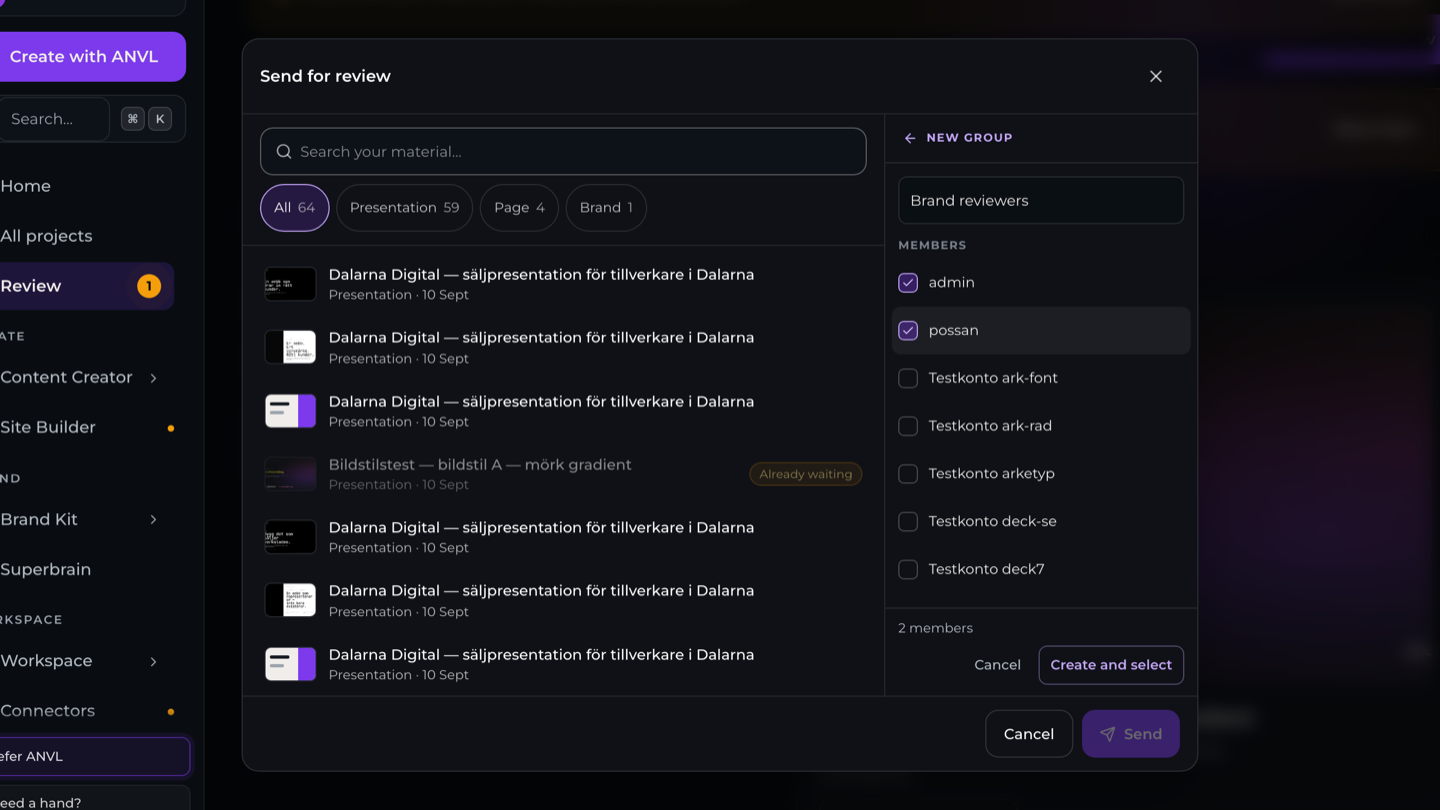
Make a group at the moment you need one
A group could only be made in one place and only used in another, with nothing connecting the two.
You can now create a group straight from the recipient list when you send something for review, see who a review went to, and delete a group without leaving requests stranded behind it.
 About groups