
Changelog
What changed in ANVL and what it means for you. We write here when something shows up in your day — not on every release.
1 Oct
2026
Ask for a page that looks like the others
Make page 5 look like pages 2 and 3 gives page 5 their sizes, spacing and components, with its own content kept, and add an end page that looks like page 1 builds the new page with the layout of page 1.
Asking for new text without giving its content — a section on allergens, say — now gives a placeholder to fill in, not an invented claim. The chat no longer asks which variant you mean when you are looking at it, and when a change is not possible it suggests what is.
1 Oct
2026
Less waiting in the conversation and the image bank
After you answer the questions in a conversation, the proposal takes a while to write. The questions it will need answered — an address, a date, a link — now appear within a second, and what you write is already filled in when the proposal arrives.
Images under Brand Kit → Images appear much faster: each card loads a small preview, and cards further down load as you scroll. Opening an image still shows the original.
1 Oct
2026
Every change holds the same quality as the first build
Refining a slide, an element or a post now goes through the same checks as a new deck — contrast, layout, logo placement and brand colours. Your change is improved, never undone: a headline you made red stays red. Redo the design redoes the layout and keeps text, figures and images, while a targeted change only touches what you point at.
One for Facebook, one for Instagram, one for LinkedIn becomes one post with a frame per channel, each in its format; Instagram and Facebook are now 4:5. Make a copy of slide 1 copies it at once, a copy in another format lands in the same folder, and In the same folder at the top of the editor takes you between them. A dropped connection during a build can be picked up again.
30 Sep
2026
Watch the build take shape
While a deck is built, the stage shows a sketch of each slide before it is written — three figures, an image on the right, three cards — and the filmstrip shows the same sketch. Then the slide lands, the images develop and the review sweeps once over the deck. The chat keeps a log of what has happened, with times.
One-pagers, posts and newsletters show the draft after 10–25 seconds instead of nearly a minute; the image and the checks follow.
30 Sep
2026
One post in several formats, and variants to compare
A post can now hold a square, a 4:5, a story and a LinkedIn version side by side. Ask for the same post as a story or for LinkedIn, and the new frame is built from the current one, in the same project. The editor, presentation mode, PDF and images show every frame in its own format, and the brand check judges each frame against its own channel.
Posts and newsletters also take variants: ask for three variants or one more with a different headline, and each is a complete alternative you can export on its own. Make a carousel of it gives a carousel, and the plus in the filmstrip starts a sentence in the chat, so you say what the new page or variant should hold before anything is built.
30 Sep
2026
One-pagers with several pages
Ask for a menu on three pages and the proposal says Build 3 pages. Each page is designed with the finished ones in view, so they belong to the same document. In the editor, add a page with … in the chat, or the plus in the filmstrip, builds the next page in the same design.
A menu, price list, poster or invitation ordered in the conversation is built as a one-pager, not a presentation, and uses the whole page instead of drawing a sheet of paper on it.
30 Sep
2026
Slides you add or rebuild get the same checks as the first build
A slide you add or rebuild in the editor now goes through the same fact, contrast and layout checks as the first build, and if a rebuild comes out worse, the better version is kept. What you write per slide is followed: Slide 2: three cards with the services gives three cards, and no panels means no panels.
Undo saves what is there now as a version first, and Stop ends the whole turn.
30 Sep
2026
Everything you create starts in Conversation
Create on the phone, the create button at the top of the menu and the Content Creator heading now all open a new conversation. On the phone, the box at the bottom goes straight into the conversation, where you can attach documents and photos.
The tour has four steps: create something in Conversation, upload your photos, invite your colleagues and review your brand. Choose photos and Invite do the step right from the tour. Until you choose a language yourself, ANVL follows your browser — Swedish if it prefers Swedish, otherwise English.
29 Sep
2026
Write a folder's instructions in a conversation
Edit on a folder now opens a conversation where ANVL asks about the client, the brief, the readers and the tone, and fills in a draft you watch grow at the edge of the window. Every field shows where it came from and can be edited with a click, and Cards | Text shows the whole text if you would rather write by hand. Nothing is saved until you press save.
In a conversation inside a folder, ANVL can also suggest writing the folder's instructions, or adding a single line to them, as a card you save yourself. A folder's images are a pool to choose from when something is built there, not a list that must all be used.
28 Sep
2026
The editor chat changes only what you ask for
Ask the chat in the presentation editor to shorten a heading or fix its spelling, and it changes that heading — not the rest of the slide or the deck. If something beyond your request changes anyway, the receipt says so. The chat answers in the language you write in, names colour changes in its receipt, and says so when a turn was cut off by a reload.
Ask it for another format — make a poster of this, a LinkedIn version — and it builds a copy in that format, leaving the original as it is. Styles show straight after an edit without reloading, and lists on freely drawn slides build one step at a time when you present.
28 Sep
2026
Fill in what's missing, and Build starts right away
Each point under What I am missing in a proposal now has its own field. Write your answers there and press Build: they go into the order and the build starts straight away — no new message, no waiting for a new proposal. You can also choose one of your brand's templates in the proposal, and images you attach stay in your message and follow the proposal into the build.
On a computer, Home now opens as a start page, with the greeting and the prompt box alone in the middle of the window.
26 Sep
2026
The brand page starts with what's missing
Fill the gaps shows one empty section at a time, with Save and continue and Skip, and the nine advanced sections are folded away under Advanced. On a phone the page is a single column.
The Superbrain page has left your menu. What you tell the conversation about your company is kept as before.
25 Sep
2026
The conversation says when your material doesn't fit the type
Order a pitch deck about a campaign, and the conversation now asks first whether it should be a carousel, a post or a pitch deck — and what a pitch deck would need: someone who should say yes, and what you are asking them for. When your material doesn't carry the type you ordered, the conversation says so and offers the type it does carry.
25 Sep
2026
Posts keep building when you leave the page
Posts, one-pagers and newsletters are now built on the server, like presentations: close the tab or switch page while one is being made, and it is there when you come back. Pressing Build again while one is running follows it instead of starting another, and Stop stops it. On a phone, a post made from the conversation is built right in the thread.
25 Sep
2026
Decks and posts are drawn from scratch for your brand
Presentations and social posts — square, 4:5 and story — are now drawn from scratch for your brand by default, instead of being filled into a ready-made layout. The slide library is still there. Posts are built around a photo and a headline that carries the message, and a LinkedIn post can be landscape when you ask for it.
A post now comes with its caption: the text published above the image, with the terms, dates and call to action, which you edit and copy under Notes. Newsletters get a masthead, a lead story and short stories in columns.
25 Sep
2026
An attached document is read before anything is built
A document attached on Home, or dropped in the box on a folder's page, now opens a conversation that reads it, instead of going straight to the editor. The conversation decides from the document and what you wrote whether it becomes a summary, a comparison or something else. Brand guidelines, a template or a form attached without a word no longer turn into a deck about themselves: the conversation asks what they are for, and points to Brand Kit if you want to import guidelines as your brand.
25 Sep
2026
Decks state only what your material says
Facts about you now come only from what you gave: the brief, the conversation, an attached document and your saved facts. A figure, e-mail address or phone number that is not there becomes a placeholder to fill in, never a number that looks confirmed — type your own figure into it and it takes the number's place. A deck no longer promises a fixed price, a guarantee or round-the-clock service because your brand mentions one somewhere; only when your brief does.
What you asked for stays, too: timeline years, the label under a big number, customer quotes, the icons you picked and a partner's logo are no longer removed as decoration.
25 Sep
2026
Upload your brand guidelines and they become your kit
In onboarding you can upload your brand guidelines as a PDF or Word file, instead of or alongside your web address. The whole document is read into your kit: named colours with their print values, typography, logo rules and placement, margins and grid, photo style, tone, and the do's and don'ts of each chapter.
A PDF can be up to 40 MB.
25 Sep
2026
A credit is only drawn for what you get
A deck, post, reply or slide rewrite that fails on our side now gives the credit back, and so does a post you stop. A request that is turned away before it starts — an image missing, an instruction too long — never costs a credit at all.
24 Sep
2026
Generated pictures and your website's pictures land in the image bank
Every picture ANVL generates for a deck, post or page is now kept under Images, as a draft in the folder Genererat. Approve one and ANVL can use it again. When ANVL reads your website during setup, up to seven of its pictures arrive as drafts too, in the folder Sajten.
23 Sep
2026
Setting up your brand is a conversation
Onboarding is no longer a form. ANVL reads your site first, takes what is there — fonts, colour roles, logo — says so, and only asks about the rest: your colours as one tap to confirm, then tone, audience, imagery and channels, as cards with options and a line of your own. One answer can fill several parts of the kit.
A pill at the top — 6 of 11 filled — shows how far your brand kit has come, and opens the list of its sections. Skip, fill it in yourself still leads to the form, with your address and the reading of your site already in place.
23 Sep
2026
One account page, and a quieter celebration
The two account pages are now one — the one the account menu opens — with your profile, passkeys, password, where you are signed in, and how to delete the account. If the connection drops while you sign in, the sign-in card stays and lets you try again.
The full-screen confetti is gone. When you reach a milestone that matters — your brand is done, your first material, your first published site — a small note appears in the corner for a few seconds.
23 Sep
2026
Folders gather the work for one client or one series
A folder in Projects gathers the conversations, materials and images for one client or one series, with instructions ANVL follows in everything built there — on top of your brand, which always wins. Each folder has its own page with a prompt box of its own. A conversation started there carries the folder's instructions and images, and the deck it builds lands in the folder.
The three most recently used folders sit under Projects in the menu. Projects and the image bank share the same folders, and Add images on a folder's page opens the image picker right there.
23 Sep
2026
Every plan has unlimited users
Invitations no longer stop at a seat count: every plan gives unlimited users, as it always promised. The workspace shows how many people you are rather than 4 of 6 seats. There is an operational ceiling of 100 people per workspace, which only shows when you are near it — and reaching it means getting in touch so we can raise it, not upgrading.
22 Sep
2026
One image picker for the bank, uploads and generated images
The prompt box, and the presentation editor when you replace an image, now share one picker: the image bank straight away with search and tags, upload by dropping files anywhere in the dialog, or generate a picture — all in one view. In the prompt box you can pick up to ten at once, and an upload that fails can be retried on the spot. The picker says before you press that uploads are saved to the image bank as drafts, and that a generated picture costs a credit.
22 Sep
2026
Ask the conversation to do it — a card for every action
What you otherwise do in menus can now be asked for in a sentence: send for review, approve or ask for changes, download, present, share or close a link, restore from the trash or an earlier version, duplicate. The conversation answers with a card that says exactly what will happen, and nothing runs until you press its button. Ask it to send a deck to a colleague and it shares it inside the workspace, not as a public link. Type /help for the whole list.
It answers about you, too. What do you know about us reads back your saved facts with the date each was confirmed, and that's no longer true retires one without deleting it. What is missing in our brand kit answers from the same measurement as the Brand Kit page.
21 Sep
2026
Speaker notes in three lengths, and a time budget for every slide
Choose Short, Medium or Long in the Notes tab before ANVL writes your speaker notes — cue words for someone who knows the subject, a full script for someone who does not. The choice is remembered per deck. On a slide that builds in steps, the notes mark where to click next, and every slide's notes open with why the slide is there.
In presenter view the clock splits your time across the slides by content. It says what the current slide gets, whether you are ahead or behind, and — when time runs short — which slide to jump to so the rest fits.
21 Sep
2026
Comment on a deck slide by slide, right in the editor
A Comments tab in the editor's inspector shows the thread for the slide you are looking at, and Whole deck groups every comment per slide. Reply to a comment, mark it as resolved — resolved ones fold away and can be brought back — or press Fix with AI to send a colleague's comment to the chat, aimed at its slide.
The Comments tab replaces the Internal tab. The fact check is still in the ⋯ menu.
21 Sep
2026
Builds on or off per slide, and «Show without builds» when time runs short
Turn step-by-step builds on or off per slide in the inspector, or for the whole deck in one tap — with one Undo. In the presenter view, Show without builds shows every slide whole and moves slide by slide, without changing the deck. A cast TV follows.
The agent chat's receipt now says what it did: the text before and after, how many sizes were corrected to your type scale, and which slides did not go through in a deck-wide change — with Try again and Rewind. It no longer sits in «Thinking…» while a question waits for your answer.
21 Sep
2026
Paste a link and ANVL reads the page
A link in a message is fetched and read: the page's title and domain appear as a chip on your message, and the conversation answers from the page's text — one page, quoted from, nothing invented beyond it. Build on a proposal that rests on a link builds from the page the way it does from an uploaded document, and the fact check counts the page as a source. A page that cannot be read — a dead link, a PDF, a timeout — is said in the thread with the reason.
Also new: speaker notes written from the deck, in the editor's Notes tab — for this slide or for every slide without notes, in your brand's tone and only from the deck's content. And the conversation answers a no, a typo or an unrelated question and stops, instead of nudging you back to a pending proposal.
Fixed in the editor: the image popover follows the image when you scroll instead of closing, and asking the AI to change a slide keeps the image you swapped and the text you corrected.
20 Sep
2026
The conversation fits your phone
One top bar instead of two, the thread across the full width, and a field that grows as you write with Document and Image as icons inside it. The proposal card fits one screen, with Build in full width and I have more to say underneath. Tap the conversation's name to switch: a sheet with your recent conversations grouped by day, and a way to all of them in Projects. Home on the phone shows your two latest conversations before the projects.
Every answer now has Copy, Redo and Edit the question, and an answer that breaks mid-way is kept with Try again instead of vanishing on reload.
20 Sep
2026
One question card, then the proposal — and decks that never make things up
Everything the conversation needs to ask goes into one card, and the proposal comes once you have answered or skipped it. A proposal with gaps becomes a question card, never an offer to build something that lacks content. The thread grows upward from the box like a chat.
Decks keep readable contrast in your own brand colours — an empty surface
colour no longer turns into white on white — and figures, names and e-mail
addresses that are not in your material become a marked placeholder such as
[CONTACT] instead of an invention. A key figure without a number is one
card fewer, never a made-up number. When you correct a fact about your
company, the new value replaces the old one everywhere.
18 Sep
2026
The fact check now sees charts
The fact check used to read only the text on a slide. A chart is not text, so an invented trend line passed as long as the numbers stayed in the drawing. A curve or a set of bars with more data points than your brief and attachments carry numbers is now flagged like any other unsupported figure, with Rewrite as the action. The check is deliberately cautious: it asks whether the numbers can exist at all, not whether they are right — that is still the reviewer's job, as before.
18 Sep
2026
The email draft lives under Create, and can write the covering email
The tool that writes a plain-text email in your brand's tone has moved from Brand Kit to Create in Content Creator, as a card next to Newsletter. It is still a scratch tool rather than a saved project, and the card says so. A bookmark to the old address still works.
New in Share & export, right under the share link: "Write the email that sends this". It opens the email draft with the deck as its brief — the title, the content in short and the link — and writes the covering email for you. Without a share link the row says so; make the link first.
18 Sep
2026
The chat asks before it uses a colour that is not in your brand
Asking the chat in the editor for a specific colour — "make the headline pink" — used to apply it even when pink appeared nowhere in your brand. Now a colour outside your palette gets an answer instead of a repainted slide: which brand colour is closest, what it is used for, and whether you want that one or your own anyway. Say "do it anyway" and yours is applied at once.
Colours that are in your brand, and black, white and grey, still go straight through. Every slide the chat rewrites or creates is measured against your brand, and the receipt says so.
18 Sep
2026
Tell ANVL something about your company once, and it asks to keep it
Say something lasting about your company in a conversation — how many you are, a certification, a result for a year — and ANVL asks whether to save it. Tick what should be kept. Saved facts are listed in Superbrain under From your conversations, with a link back to where you said them, and can be confirmed, edited or removed there.
A budget, a launch date, a slide count or the audience for the deck you are building right now is never offered. Those belong to the order, and they stay in the conversation and in the deck.
Saved facts are used only where the subject fits — a warranty figure reaches a slide about quality, never one about company cars.
18 Sep
2026
Select many images and tag, move or approve them in one go
Every image card in the bank has a checkbox. Tick several — Shift-click for a range, Ctrl+A for everything in view — and the bar at the bottom offers Add tag, Move to folder, Approve, Archive and Delete. A hundred breakfast photos get the tag "breakfast" in one click; tags the images already had are kept.
Images can now live in folders, shown as a row above the grid like in Projects. A folder exists while something is in it and never hides an image that is not in one. And everything you upload — in the site builder, as a logo, as an attachment in the conversation — lands in the image bank directly, as a draft. There is no separate media library any more, and no "Import from media": there is nothing left to import from. Thumbnails of your decks and screenshots of web pages no longer show up among your images either.
18 Sep
2026
Close the tab — the deck finishes building anyway
A deck build runs on ANVL's server, not in your browser. Close the tab, switch pages or put the phone down and it finishes anyway, title and fact check included. Open the deck from any device mid-build and watch it progress; a reload never restarts it. Stop really stops — it keeps the slides that were finished and stops the image generation too, so no stray pictures cost credits after you pressed it. If the server restarts mid-build you are told, and can build again with one click.
The conversation sees the build: the deck card in the thread says "Building 3 of 4" while it happens and "Done" when it is. Drop a PDF, Word or Excel document into the conversation and it stays there as source material — ask about its contents first, then build the summary from it; two documents give a comparison. And the conversation knows your workspace: "send it to Anna for review" becomes a card with the project, the recipient and the message, and nothing happens until you press the button. It can request reviews, share, remind, star, rename and move to a folder — never delete permanently, never approve on someone's behalf.
18 Sep
2026
Carousels are built from the library, in your brand's style
A carousel for Instagram or LinkedIn is now built the way a deck is: from a library of square layouts drawn for the feed, filled with your content and checked against your brand. It is faster and cheaper than before, and every frame keeps your brand's measurements.
The library follows your brand's style. The style direction in your brand kit — minimal, editorial, playful, luxury, bold, warm, tech or retro — decides which layouts a carousel is built from; the neutral ones fit every brand, so no frame is ever left empty. Carousels with pictures you chose yourself, or from a template, are still drawn as before.
18 Sep
2026
Accept the agreement when you apply, not when you activate
The checkbox for the data processing agreement and the privacy policy is on the request-access form, where you leave your details. Activating the account afterwards — with a passkey or a password — no longer asks for it.
The person who applies on behalf of the company is the one who accepts. A colleague invited to the workspace later signs nothing. Company is optional on the form; name and email are still required.
17 Sep
2026
Your AI runs in the EU unless you have asked for otherwise
Every account that has not chosen where its AI runs now runs it in the EU rather than the United States, and onboarding no longer asks the question. Sweden or the United States is set per account by us — say so and it is done.
17 Sep
2026
Drop a document or a picture straight into the box on Home
Two buttons under the box, Document and Image. Drop a PDF, Word, Excel or CSV file on the card — up to five at once — and ANVL builds a summary deck from it, or a comparison when you give it two. Drop a picture, or paste a screenshot, and it goes into the deck you order.
The From a document link and the More options panel under the box are gone; both jobs are done here now.
17 Sep
2026
A deck is ready in about a minute, and never drops a slide
Presentations are now built from a library of slide layouts that have each been measured in a light, a dark and a filled brand before being let in. The text fits, the contrast holds, every slide the outline promised is there, and the wait is about a minute instead of three.
Figures in your brief become real diagrams, image-led slides alternate with text, and two decks in a row do not look alike. Decks from a template, from your saved layouts, or with pictures you chose yourself are still drawn as before.
17 Sep
2026
Ask, plan and discuss with ANVL in the box on Home
The box on Home is now a conversation. Ask where something is, ask which posts you should make this month, talk a pitch through — the answer comes word by word, and "do number two" in your next message builds it.
A short answer stays in the box; anything longer opens the conversation, where the whole thread lives. Conversations are saved on their own and are back under Recent conversations on Home and under Projects.
ANVL answers from your actual decks and posts when you ask what you have made before, and a thin order gets a question or two before anything is built.
9 Sep
2026
Present with your notes on a screen only you can see
Presenting now opens a second window for you: the next slide, your notes and a clock. The audience sees the slide and nothing else.
One click puts the presentation on a projector or casts it to a TV, and the controls get out of the way until you move the mouse.
Sharing your screen in a video call: share the presentation window, not the whole screen, or your notes go out with it.
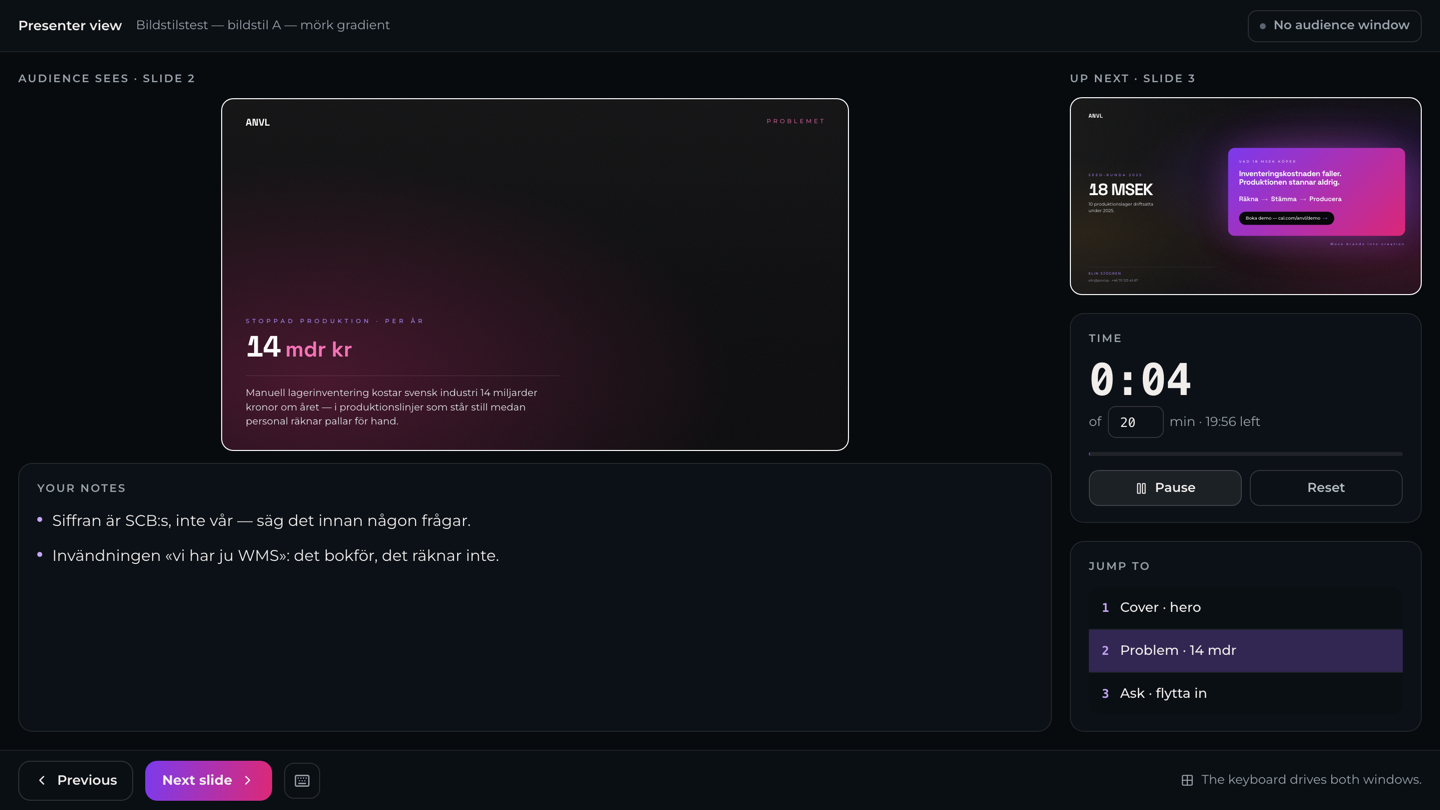 How to present
8 Sep
2026
Ask for the number of seats you actually need
Asking for more room in your workspace used to be a request without a number, which meant a conversation before anything could happen.
You now say how many seats you need, and the request carries that number with it. Nobody is charged by asking — we come back to you.
4 Sep
2026
Make a group at the moment you need one
A group could only be made in one place and only used in another, with nothing connecting the two.
You can now create a group straight from the recipient list when you send something for review, see who a review went to, and delete a group without leaving requests stranded behind it.
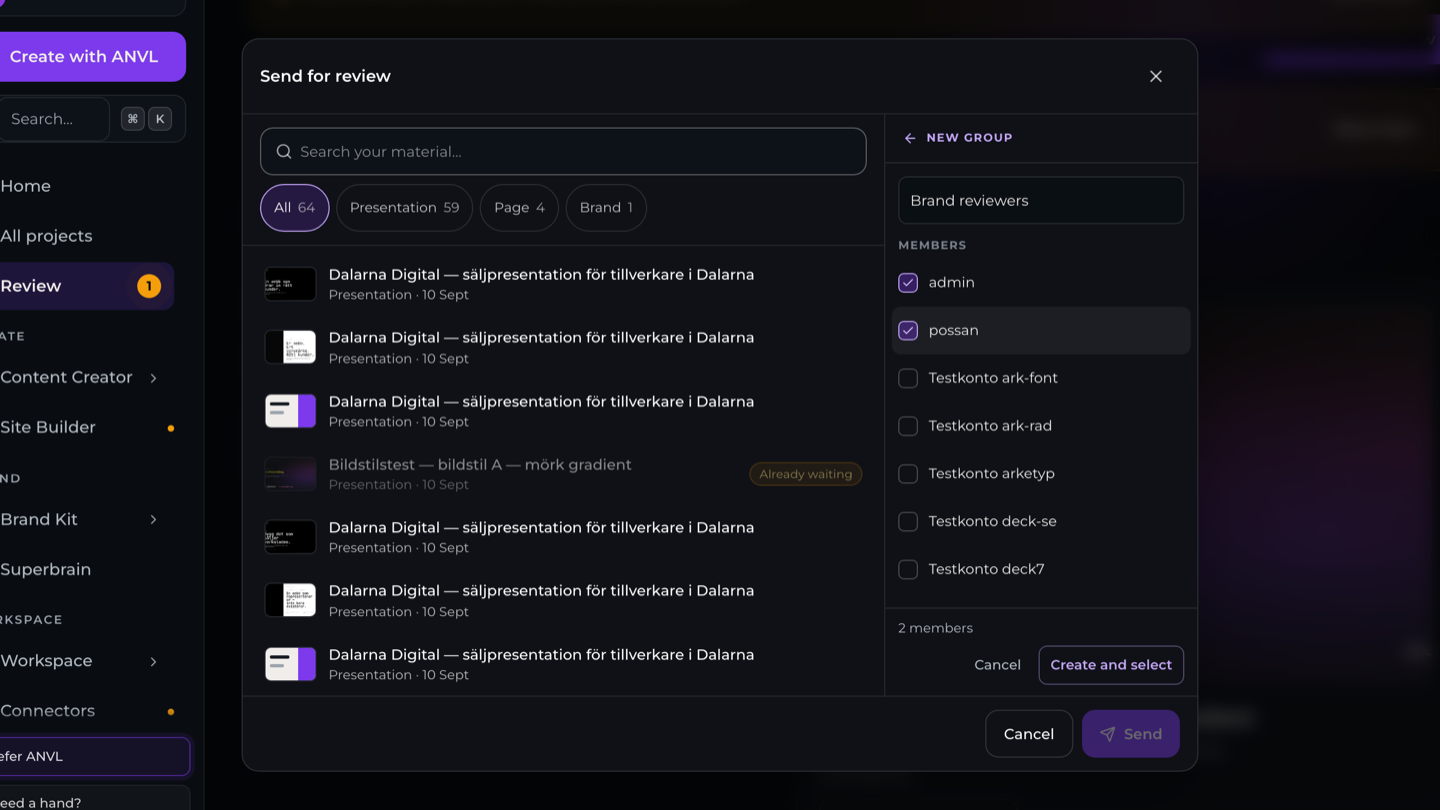 About groups
3 Sep
2026
Set your own password
Account now lets you create a password if you do not have one, or change the one you have.
2 Sep
2026
The Sales package format is gone — use Sales deck
The «Sales package» presentation type was built on an internal price list that is no longer maintained, so it has been removed.
If it is what you reached for, use Sales deck instead. That is the one meant for your sales material, and always was.